Understanding Kubernetes: Deployments, ReplicaSets & StatefulSets
In the last article we took a closer look at Pods. Time for the next steps: How do we get Pods? Most tutorials normally tell you to create a deployment and there you have your Pod. But what is happening behind the scenes? And what are ReplicaSets, StatefulSets - or even DaemonSets? This is what we want to sneak in now.
Controllers manage other objects
What we already know is that one of the core Kubernetes ideas is the reconciliation loop: controllers continuously compare the actual cluster state with the desired state and adjust things until both match. This applies to all workload resources as well.
Objects like Deployments, ReplicaSets, StatefulSets, and DaemonSets are not “active” components. They are simply declarative records stored in the API server. Nothing about them runs by itself.
The actual work happens in controllers inside the Kubernetes Controller Manager. These controllers watch the API server for changes and continuously reconcile the resources they are responsible for.
That means: when you create a Deployment, you are not starting anything directly. Instead, the Deployment controller notices the new object and creates the resources needed to make it real.
A typical application hierarchy looks like this:
Deployment
↓
ReplicaSet
↓
Pods
Pods: are the actual runtime units that run on worker nodes. They are intentionally minimal and do not handle scaling, updates, or self-healing themselves. Because they are ephemeral by design, you normally do not manage them directly.
ReplicaSets: sit one layer above and ensure that the correct number of Pod replicas are running at all times. If Pods crash or disappear, the ReplicaSet controller reconciles the difference and creates replacements. This is a key part of Kubernetes’ self-healing behavior.
Deployments: are what most users interact with. They manage ReplicaSets and add higher-level functionality such as:
- rolling updates
- rollout history
- rollbacks
- declarative upgrades
When you update a Deployment, Kubernetes does not modify Pods directly. Instead, the Deployment controller creates a new ReplicaSet, gradually shifts traffic to it, and eventually retires the old one.
So how do Deployments create new ReplicaSets
Let’s assume we update the image version of a Deployment. Kubernetes does not modify existing Pods directly. Instead, the Deployment controller creates a new ReplicaSet based on the updated Pod template.
From that point on, the rollout process begins: the new ReplicaSet is gradually scaled up, while the old ReplicaSet is scaled down. During this process, Kubernetes ensures that the application remains available by keeping enough Pods running at all times.
If something goes wrong, kubectl rollout undo deployment <deployment-name> can switch back to the previous ReplicaSet.
This works because each ReplicaSet effectively represents a version of the Deployment’s Pod template, and the Deployment keeps track of these versions for rollout purposes.
Let’s try this out :)
We first create a simple Deployment:
apiVersion: apps/v1
kind: Deployment
metadata:
  name: nginx-demo
spec:
  replicas: 2
  selector:
    matchLabels:
      app: nginx-demo
  template:
    metadata:
      labels:
        app: nginx-demo
    spec:
      containers:
        - name: nginx
          image: nginx:1.27
and apply it via
kubectl apply -f deployment.yaml
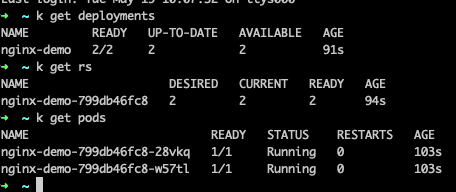
When inspecting the resources, we will find a Deployment, a ReplicaSet and two Pods:
Next step: We’ll update the deployment by running
kubectl set image deployment/nginx-demo nginx=nginx:1.28
and check the ReplicaSets again:
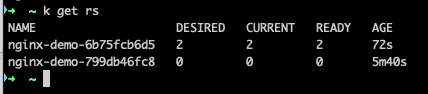
And there we have two different ReplicaSets.
Scaling is just reconciliation again
Scaling workloads works the same way: it is purely a change to the desired state in the Kubernetes API. When we run:
kubectl scale deployment nginx-demo --replicas=5
we are updating the Deployment’s desired replica count. From there:
- the Deployment controller updates its ReplicaSet
- the ReplicaSet controller ensures the correct number of Pods exist
- additional Pods are created or removed accordingly
No Pods are modified directly - everything is still driven by reconciliation.
StatefulSets: when workloads need identity
So far, everything discussed works great for stateless workloads. But some applications need more than “just replicas”, for example databases. What they need is e.g. stable hostnames, stable storage, a predictable startup / shutdown order, or a stable network identity.
This is where StatefulSets come in. Unlike Deployments, StatefulSets create Pods with stable identities that persists across rescheduling - and this becomes super important for distributed systems where cluster members need predictable identities.
Bonus: DaemonSets
There is one more important workload controller worth mentioning: DaemonSets. While Deployments focus on “How many replicas should exist?”, DaemonSets instead answer: “This Pod should run on every node.”
This becomes useful for workloads that provide node-level functionality, such as log collecting or security agents, monitoring exporters, or Kubernetes networking components (CNI plugins). A DaemonSet ensures that every new node gets a Pod automatically, while Pods are removed again once nodes leave the cluster. So Kubernetes ties Pod placement to the available nodes in the cluster.
Many critical Kubernetes system components themselves are often running as DaemonSets. We can check that by running
kubectl get daemonsets -A
So, when to use what
At this point, Kubernetes workload resources hopefully start feeling a bit less random :) But in practice, the obvious question becomes: “Which one should I actually use?”
The good news: Most workloads naturally fit into one category.
Deployments are the default choice for most stateless workloads, such as:
- web applications
- APIs
- frontend applications
- microservices
- internal tooling
A useful mental model is: “Are the individual Pods replaceable - so no side effects?” If yes, then a Deployment is the right choice. A very large percentage of Kubernetes workloads are Deployments.
StatefulSets become important once workloads need stable identities or persistent storage. Typical examples include:
- databases
- Kafka
- Redis clusters
- Elasticsearch
- ZooKeeper
DaemonSets are usually used for infrastructure-related workloads that should exist on every node. Typical examples here include:
- monitoring agents
- log collectors
- security agents
- Kubernetes networking components
So, what about standalone Pods? Technically, they exist as well. But in practice they are mostly useful for quick testing or debugging. Real applications are usually managed through controllers instead.
Useful debugging commands
To understand workload behaviour, these commands come in pretty handy:
kubectl get deployments
kubectl get rs
kubectl get pods
kubectl describe deployment nginx-demo
kubectl rollout status deployment nginx-demo
kubectl rollout history deployment nginx-demo
Summing up
At first glance, Kubernetes workload resources can feel unnecessarily layered. But internally, each abstraction solves a different problem:
- Pods run workloads
- ReplicaSets maintain replica counts
- Deployments manage rollouts and upgrades
- StatefulSets provide stable identity for stateful systems
- DaemonSets run workloads on every node in the cluster
All of them are built on the same principles: desired state, controllers, and reconciliation.
Next up: We’ll dig into one of the biggest (and potentially most confusing) Kubernetes topics: networking :)
header image created by buddy ChatGPT